
How it works
From one frozen STEP to an adjustable recipe.
We take a single fixed-size model of your part, rebuild it with knobs for dimensions like length and diameter, wire those knobs to a web configurator, and let your customer download a ready-to-use STEP the instant they request a quote — so you get designed in before competitors reply.
The delivery loop
Photograph in. Recipe out. Knobs on the web.
Their frozen STEP tells you exactly what to build → you rebuild it as an adjustable recipe → the website’s sliders wire to the recipe’s knobs → the customer turns the knobs and watches it change → they download a fresh STEP of their exact version → they drop it into their own design and keep working → that supplier just got designed in while competitors are still answering email.
01
Why we ask for one STEP file
Their STEP is a photograph of a finished part — exact geometry, shop conventions, real gauge and detail. It is the ground truth we build against. What it is not is adjustable: no knobs, no “length” variable. It is the spec, not the product.
02
Why we remodel it (this is the whole job)
You cannot make a photograph adjustable by editing the photograph. We rebuild the part so dimensions are variables and related geometry recalculates — trough radius from screw diameter, length from turns × pitch. That parameterization is what we sell: which knobs move, how far, and how everything relates.
03
Why web sliders connect to those variables
Named knobs (diameter, length, pitch…) get a front-end. Slide length on the site → send a number to the model → it rebuilds → the customer sees it update. The website doesn’t know CAD; it talks to the knobs we exposed.
04
Why they download a STEP — and why STEP specifically
They’re putting the part into a larger assembly in their own CAD. They need usable geometry, not a pretty picture. STEP is the universal handshake — SolidWorks, Inventor, Creo, NX all read it. Anyone can use this.
End-to-end
Reference STEP in. Designed-in STEP out.

01
One frozen STEP as reference
You send a correct part at one size — shop conventions and all. That file is the ground truth we build against, not the adjustable product.
02
Rebuild as a parametric recipe
We remodel so length, diameter, and related dims are variables with relationships — not a fixed photograph. One recipe becomes thousands of valid parts.
03
Wire web knobs to those variables
Sliders and dropdowns on your branded site send numbers to the model. The customer sizes the part; the recipe rebuilds; live 3D updates.
04
See the geometry
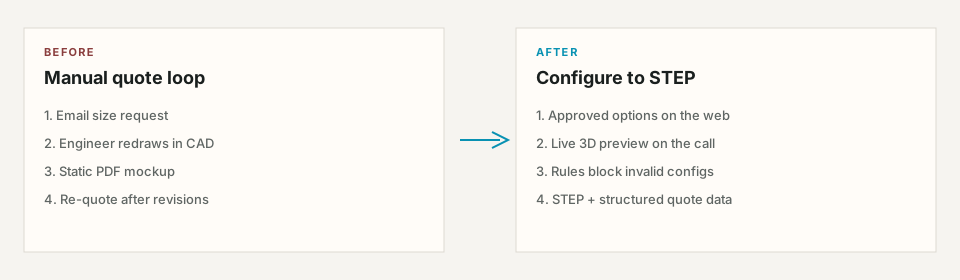
No PDF ambiguity. They know exactly what they asked for before anyone quotes.
05
Download a fresh STEP
Backend rebuilds their exact configuration and exports STEP — the universal CAD handshake — into their assembly now.
06
Quote with exact spec
Quote carries frozen parameters. You get designed in while competitors are still answering email.
Who wins
Always both halves of the value.
For the business (who pays)
Higher win rate. Comparison-shopping buyers design around the supplier who delivers a correct model instantly — before competitors respond.
For their customer (who uses it)
No more PDF guesswork or back-and-forth decoding dimensions. See it, get the STEP file, keep designing. Quote requests carry the exact spec.
For operations
Quote requests arrive with frozen parameters. Publish, revoke, and manage families from the App — not a shared-drive guess.
Engagement shape
Prove one family. Then expand.
A Validation Pilot starts from one correct STEP of one family — we parameterize it, wire the web knobs, and prove instant STEP + designed-in motion. DFY Catalog expands to a branded multi-family experience. Details live on Pricing.
Next step
Book a walkthrough of the recipe path.
Book a 15-minute walkthrough. Higher win rate. Comparison-shopping buyers design around the supplier who delivers a correct model instantly — before competitors respond.